10. Plans and pricing
On this page: You compare the plans and change yours if you need to.
Compare and choose plans on "Plans" in the app menu. Plan changes go through Shopify's approval screen.
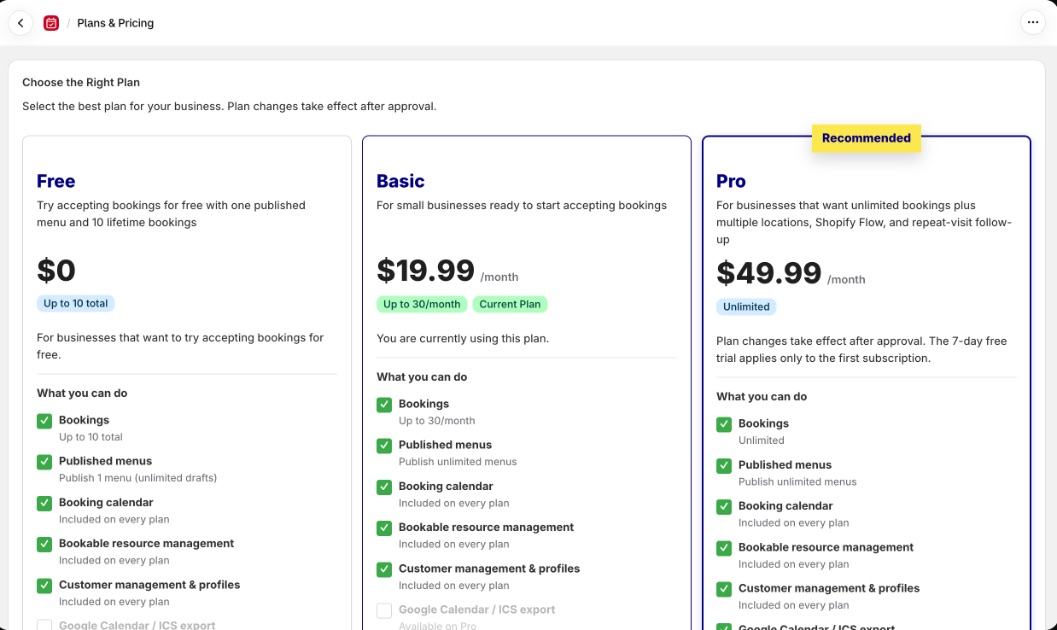
Plans at a glance
| Plan | Monthly price | Bookings | Good for |
|---|---|---|---|
| Free | $0 | 10 in total | Trying out bookings for free, with one published menu and 10 bookings in total |
| Basic | $19.99 | 30 per month | Small businesses ready to start taking bookings |
| Pro | $49.99 | Unlimited | Businesses that want unlimited bookings plus multiple locations, Shopify Flow and repeat-visit follow-up |
Prices are monthly, in US dollars, and are charged through your Shopify bill. There's no fee per booking. Pro includes everything in Basic.
Compare features
In the table, "Yes" means included and "No" means not included. The order matches the "Plans" page.
| Feature | Free | Basic | Pro |
|---|---|---|---|
| Bookings | 10 in total | 30 per month | Unlimited |
| Published menus | 1 (unlimited drafts) | Unlimited | Unlimited |
| Booking calendar | Yes | Yes | Yes |
| Bookable resource management | Yes | Yes | Yes |
| Customer management & profiles | Yes | Yes | Yes |
| Google Calendar / ICS export | No | No | Yes |
| Multi-location | No | No | Yes |
| Shopify Flow automation | No | No | Yes |
| Repeat-visit follow-up (lapsed customers, customer tags) | No | No | Yes |
These are available on every plan:
- Bookings page (calendar view, adding bookings by hand, editing, cancelling, CSV export)
- Booking questions
- Taking a waitlist, and handling paid order exceptions
- The customer's My Page (checking, cancelling and rescheduling bookings)
- Customer list CSV export, customer record fields, customer notes and the duplicate check
- Looking up bookings with Shopify Sidekick (8. Calendar sync and Sidekick)
How to use the Pro features:
| Feature | Where it's explained |
|---|---|
| Google Calendar / ICS export | 8. Calendar sync and Sidekick |
| Multi-location | 1. Initial setup |
| Shopify Flow automation | 9. Automate with Shopify Flow |
| Repeat-visit follow-up | 6. Customers and customer records |
How bookings are counted
Your plan's booking count includes both bookings made on your store and bookings you add by hand in the admin. You can see the current count under "Plan" in "Store status" on the home page.
| Plan | How it's counted | When you reach the limit |
|---|---|---|
| Free | The total of bookings confirmed on Free. Cancelling a booking on the Bookings page doesn't give it back. A booking whose order you cancel in Shopify is taken out of the count | No new bookings are accepted. Your store shows "New bookings are currently not accepted." |
| Basic | Bookings per 30 days. The reset date is shown on the home page. Cancelled bookings are taken out of the count | No new bookings are accepted until the reset. Your store shows "Booking limit reached. Please try again later." |
Bookings already taken aren't affected by reaching the limit. When you're close to the Free limit, the home page shows "Free bookings remaining: (number)".
7-day free trial
Basic and Pro are free for the first 7 days of your first subscription. Monthly billing starts when the trial ends. The trial applies to your first subscription only.
Change your plan
- Open "Plans" in the app menu
- On the plan you want, click "Subscribe to (plan)", "Upgrade to (plan)" or "Switch to (plan)"
- Review the details on Shopify's approval screen and approve
The new plan applies as soon as you approve it. Canceling a paid plan returns the store to Free.
What happens when you downgrade
| What changes | What happens |
|---|---|
| Locations taking bookings | Going from Pro to Free or Basic narrows active locations down to one, keeping the location with the most shifts. Return to Pro and the locations that were paused take bookings again |
| Published booking menus | Going to Free narrows published menus down to one. Return to a paid plan and they go back to how they were. Menus you published or unpublished yourself while on Free stay as you set them |
| Calendar subscriptions and Shopify Flow | Subscription URLs stop returning bookings, and triggers are no longer sent to Flow |
| Shopify customer tags | Syncing stops. Tags already applied stay in place |
Bookings you've already taken, customer records and customer notes all stay when you downgrade.